Hot Reload: The Undo Button for Coding Mistakes🔥
What if every mistake you made disappeared with a tap?

I love explaining tech concepts, that seem like a nightmare!
Imagine cooking maggi, and every time you add salt, you restart the stove.
Wouldn’t it be better to just taste and tweak?
That’s what hot reload does — it lets you tweak the recipe while it’s cooking.
(too hot to handle) sorry for my random broken humor lol
The Problem: Developer Flow is Fragile
You're deep in thought — fixing padding, changing a button color, adjusting the layout.
You hit save, but in the old world of mobile dev, you'd be met with:
A rebuild
A slow compile
App restart
Manually navigating back to the screen you were testing
It was like trying to edit a photo — and having to re-scan the whole roll of film every time.
Your flow breaks. Your focus shifts.
And boom, you're scrolling memes instead of fixing margins.
The Traditional Development Cycle: Slow, Clunky, and Painful
Before Flutter revolutionized app development, mobile devs worked like this:
1. Code, Compile, Run... Repeat
You wrote some code.
You hit build.
You waited.
You ran the app.
You manually clicked through screens to test a single change.
Even to tweak a button’s padding or fix a typo — you had to go through the entire cycle. This process wasn’t just tedious. It came with problems.
2. Time-Consuming Iterations
Compiling even a simple app could take minutes, especially on larger codebases. Multiply that by how often you make small UI tweaks, and you’ve already lost hours each day.
3. Loss of Application State
Each restart wiped everything: text in forms, navigation state, user login — gone. Want to test a 3rd-step form flow? You had to re-login, re-navigate, re-type. Every. Single. Time.
4. Resource Intensive
Every rebuild hit your CPU hard. Fans spun, RAM filled, and productivity dropped. It wasn’t just slow — it drained your machine and your patience.
5. Limited Collaboration
With longer cycles, developers pushed fewer updates. Integrating teammates' changes often led to conflicts and slower team velocity.
Then Came Flutter’s Hot Reload!🔥
Flutter introduced a game-changer: Stateful Hot Reload. Suddenly, developers could make UI changes and see them instantly — without restarting the app and without losing state.
This wasn’t just helpful — it was revolutionary. Here’s why:
No rebuild
No navigating back to the screen
No login again
Just code → save → boom, it’s there
🧙♂️ Flutter devs felt like wizards.
Hot reload helps you stay in flow, experiment faster, and ship better designs in less time.
Other frameworks and IDEs have tried catching up with partial reloads or live previews, but Flutter was one of the first to nail it this smoothly and consistently.
Hot reload keeps you in the zone.
No more restart. No more waiting.
Just code → save → boom, it’s there.
Hot Reload = fixing your LEGO robot while it’s dancing
Hot Restart = breaking it apart and rebuilding it from the base
Full Restart = leaving the house, coming back, and rebuilding the robot from scratch
So if you just changed the robot’s hat — don’t leave the house. Just hot reload it.
Gentle Tech Breakdown
Flutter keeps your app running in a VM (virtual machine).
When you hot reload, it:
Injects new code into the running Dart VM
Rebuilds the widget tree
Preserves your current app state
So you don’t lose anything — like text in a form, or which tab you’re on.
Or inside VS Code / Android Studio — just click the lightning bolt ⚡
Native Development (Old Way) = Rewriting a book by hand because you changed one word.
Flutter’s Hot Reload = Using a magic pen to edit the book while someone reads it.
(Technically, Xcode/Android Studio had incremental builds, but nothing as fast or seamless as Hot Reload.)
Under the Hood: How Hot Reload Works
Hot Reload might seem magical at first — like coding sorcery.
But behind the curtain is some clever engineering.
Understanding how it works not only demystifies it, but helps you use it better. Let’s peek under the hood.
Sounded a bit nerdy? Like something out of a sci-fi movie?
I feel you. Let’s make it human again simple and clear:
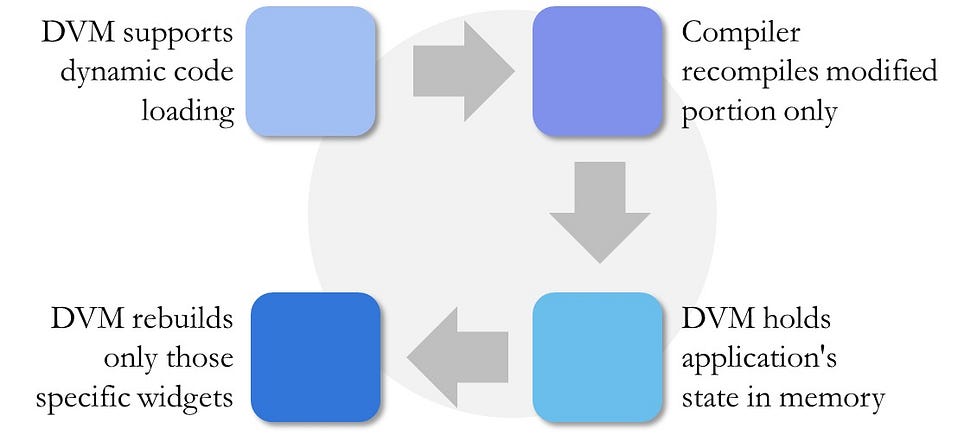
Flutter apps run inside a Dart VM (Virtual Machine).
When you hit hot reload:
The updated source code is injected into the running VM
The widget tree is rebuilt
Your app state is preserved
So if you were typing in a form or halfway through a flow, none of that resets.
In short:
Native Way = Rewriting a book by hand because you changed one word
Flutter Way = Using a magic pen to fix it mid-reading ✨
(Technically, other IDEs had incremental builds. But nothing came close to Flutter’s speed and smoothness.)
Real-World App Relevance
You’re building a Notes App, and you:
Change the font size → 🔥 hot reload
Add a new screen or widget → 🔥 hot reload
Fix a typo in a button → 🔥 hot reload
But if you:
Add a new dependency (
pubspec.yaml)Modify main(), constructor args, or global state
→ You’ll need a hot restart or full restart.
Conclusion: Code Faster, Stay in the Zone
Hot Reload isn’t just a feature—it’s a superpower that lets you:
Experiment fearlessly (no more "what if this breaks everything?").
Fix mistakes instantly (like an undo button for coding).
Build UIs 10x faster than native Android/iOS workflows.
So next time you tweak a widget and see it update in real-time, remember: this wasn’t always possible. Flutter changed the game.


